Home & Lab Network Refresh MikroTik Style Part 2 - Routing
Table of Contents
This is a continuation of a previous post expanding my revised home networking setup to include Routing.
Overview Diagram
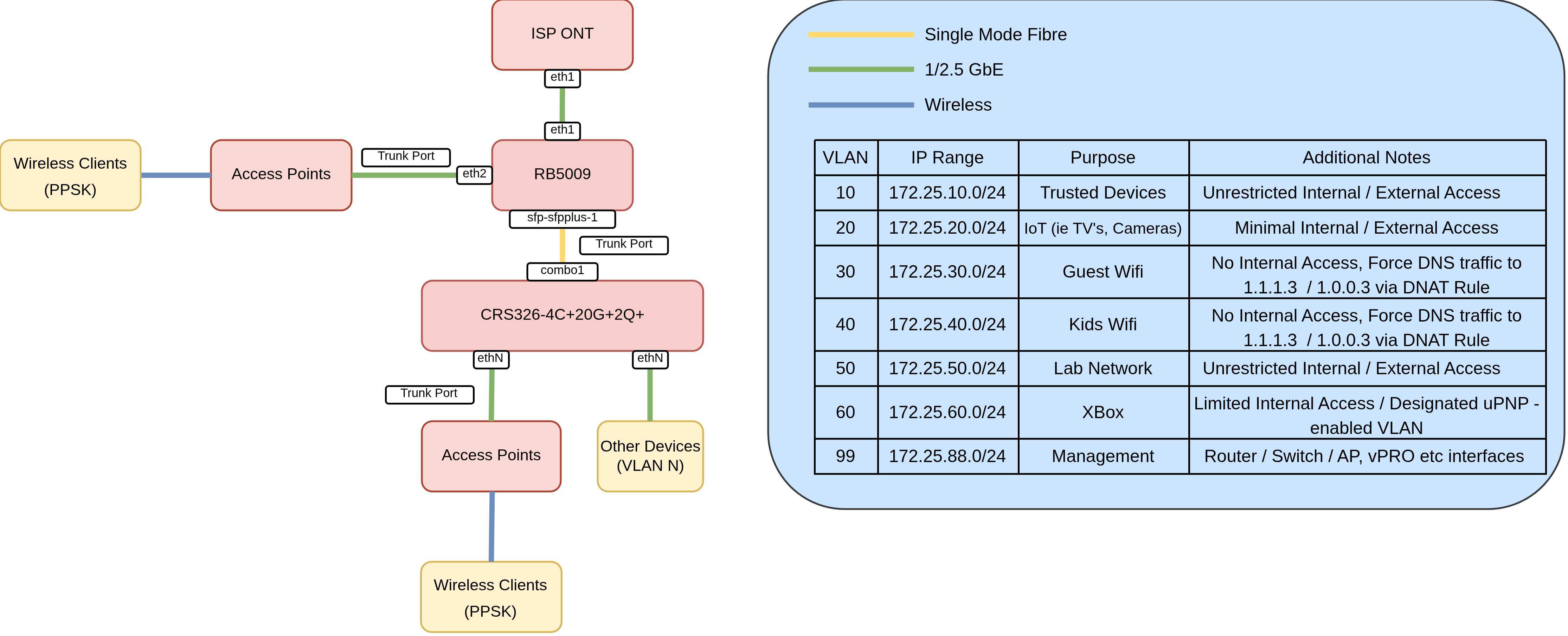
With the L2 configuration completed setting up routing is pretty straightforward.
Objectives
- DHCP Services: DHCP is configured for every VLAN.
- Dynamic Routing (BGP) for High Available Lab: I use Cilium and BGP for my Turing Pi Cluster, therefore I will configure BGP peering between these devices.
- Encrypted Upstream DNS and Adblocking: All router-resolved DNS queries are encrypted using DNS over HTTPS pointing to Cloudflare in combination with RouterOS’s
adblockfeature. - Network Segmentation:: Some VLAN’s will be Isolated, only allowing outbound connectivity.
DHCP Services
Add the respective sub interfaces, one for each VLAN. Each of these VLAN’s are already tagged to the bridge interface, which is a requirement.
/interface vlan
add interface=bridge1 name=vlan10-trusted vlan-id=10
add interface=bridge1 mvrp=yes name=vlan20-iot vlan-id=20
add interface=bridge1 name=vlan30-guest-wifi vlan-id=30
add interface=bridge1 name=vlan40-kids-wifi vlan-id=40
add interface=bridge1 name=vlan50-lab-1 vlan-id=50
add interface=bridge1 name=vlan60-xbox vlan-id=60
add interface=bridge1 name=vlan99-mgmt vlan-id=99
As we’re providing services including routing, each interface will need an IP address:
/ip address
add address=172.25.99.1/24 interface=vlan99-mgmt network=172.25.99.0
add address=172.25.10.1/24 interface=vlan10-trusted network=172.25.10.0
add address=172.25.20.1/24 interface=vlan20-iot network=172.25.20.0
add address=172.25.30.1/24 interface=vlan30-guest-wifi network=172.25.30.0
add address=172.25.40.1/24 interface=vlan40-kids-wifi network=172.25.40.0
add address=172.25.50.1/24 interface=vlan50-lab-1 network=172.25.50.0
add address=172.25.60.1/24 interface=vlan60-xbox network=172.25.60.0
The IP Pools dictate the range of IP addresses given to devices requesting one. In this instance, one for each VLAN:
/ip pool
add name=vlan99-dhcp-pool ranges=172.25.99.20-172.25.99.254
add name=vlan10-dhcp-pool ranges=172.25.10.20-172.25.10.254
add name=vlan20-dhcp-pool ranges=172.25.20.20-172.25.20.254
add name=vlan30-dhcp-pool ranges=172.25.30.2-172.25.30.254
add name=vlan40-dhcp-pool ranges=172.25.40.2-172.25.40.254
add name=vlan50-dhcp-pool ranges=172.25.50.2-172.25.50.254
add name=vlan60-dhcp-pool ranges=172.25.60.2-172.25.60.254
A DHCP server dishes out addresses to the respective network segments:
/ip dhcp-server
add address-pool=vlan99-dhcp-pool interface=vlan99-mgmt name=vlan99-dhcp
add address-pool=vlan10-dhcp-pool interface=vlan10-trusted name=vlan10-dhcp
add address-pool=vlan20-dhcp-pool interface=vlan20-iot name=vlan20-dhcp
add address-pool=vlan30-dhcp-pool interface=vlan30-guest-wifi name=vlan30-dhcp
add address-pool=vlan40-dhcp-pool interface=vlan40-kids-wifi name=vlan40-dhcp
add address-pool=vlan50-dhcp-pool interface=vlan50-lab-1 name=vlan50-dhcp
add address-pool=vlan60-dhcp-pool interface=vlan60-xbox name=vlan60-dhcp
The dhcp-server network object is used to define the DNS server(s) and gateway clients receive. For two of my networks I’m defaulting to the upstream cloudflare “Family” DNS.
/ip dhcp-server network
add address=172.25.10.0/24 dns-server=172.25.10.1 gateway=172.25.10.1
add address=172.25.20.0/24 dns-server=172.25.20.1 gateway=172.25.20.1
add address=172.25.30.0/24 dns-server=1.1.1.3,1.0.0.3 gateway=172.25.30.1
add address=172.25.40.0/24 dns-server=1.1.1.3,1.0.0.3 gateway=172.25.40.1
add address=172.25.50.0/24 dns-server=172.25.50.1 gateway=172.25.50.1
add address=172.25.60.0/24 dns-server=172.25.60.1 gateway=172.25.60.1
add address=172.25.99.0/24 dns-server=172.25.99.1 gateway=172.25.99.1
Add DHCP Client to the WAN port:
/ip dhcp-client
add interface=ether1 name=wan-dhcp use-peer-dns=no
Dynamic Routing (BGP) for High Available Lab
Create the BGP instance:
/routing bgp instance
add as=64512 name=default-bgp router-id=172.25.50.1
Create a connection to each of the RK1 nodes:
/routing bgp connection
add afi=ip disabled=no instance=default-bgp local.role=ibgp name=srv-rk1-01 output.default-originate=always remote.address=172.25.50.241 .as=64512 routing-table=main
add afi=ip disabled=no instance=default-bgp local.role=ibgp name=srv-rk1-02 output.default-originate=always remote.address=172.25.50.242 .as=64512 routing-table=main
add afi=ip disabled=no instance=default-bgp local.role=ibgp name=srv-rk1-03 output.default-originate=always remote.address=172.25.50.243 .as=64512 routing-table=main
add afi=ip disabled=no instance=default-bgp local.role=ibgp name=srv-rk1-04 output.default-originate=always remote.address=172.25.50.244 .as=64512 routing-table=main
Encrypted Upstream DNS and Adblocking
The following accomplishes three things:
- Enables remote requests (clients making DNS requests to the router).
- Configures cloudflare as the upstream DNS provider leveraging DNS over HTTPS.
- Increases the default DNS cache size to accommodate the adlists.
- Enables MDNS between two VLANs to aid in discovery protocols.
/ip dns
set allow-remote-requests=yes cache-size=81920KiB mdns-repeat-ifaces=vlan10-trusted,vlan20-iot use-doh-server=https://1.1.1.1/dns-query verify-doh-cert=yes
Network Segmentation
To make things easier, interface lists can be leveraged. I’ve specified three:
/interface list
add name=LAN_ISOLATED
add name=LAN
add name=WAN
LAN_ISOLATED - VLAN’s that have outbound connectivity, but not internally, unless explicitly defined.
LAN - VLAN’s that have internal and external access, typically for “trusted” networks.
WAN - A container for my WAN interface, I only have one, but putting it in its own Interface List makes firewall rules easier to read.
To populate these lists, add the VLAN interface accordingly:
/interface list member
add interface=ether1 list=WAN
add interface=vlan99-mgmt list=LAN
add interface=vlan10-trusted list=LAN
add interface=vlan20-iot list=LAN_ISOLATED
add interface=vlan40-kids-wifi list=LAN_ISOLATED
add interface=vlan30-guest-wifi list=LAN_ISOLATED
add interface=vlan50-lab-1 list=LAN
add interface=vlan60-xbox list=LAN_ISOLATED
To enforce this behavior, I added to my forward chain:
add action=drop chain=forward comment="Drop LAN_ISOLATED to anything but WAN" in-interface-list=LAN_ISOLATED out-interface-list=!WAN
Which also means that Isolated VLAN’s cannot communicate with other isolated VLANS
Additionally, a DNAT rule is configured to forcefully direct DNS traffic alongside the default DNAT rule for external connectivity.
/ip firewall nat
add action=masquerade chain=srcnat comment="defconf: masquerade" ipsec-policy=out,none out-interface-list=WAN
add action=dst-nat chain=dstnat comment="Force Kids DNS to Cloudflare Family" dst-port=53 in-interface=vlan40-kids-wifi protocol=udp to-addresses=1.1.1.3
add action=dst-nat chain=dstnat comment="Force Kids DNS to Cloudflare Family (TCP)" dst-port=53 in-interface=vlan40-kids-wifi protocol=tcp to-addresses=1.1.1.3